
A new Steam Client update has been released and will be automatically downloaded.
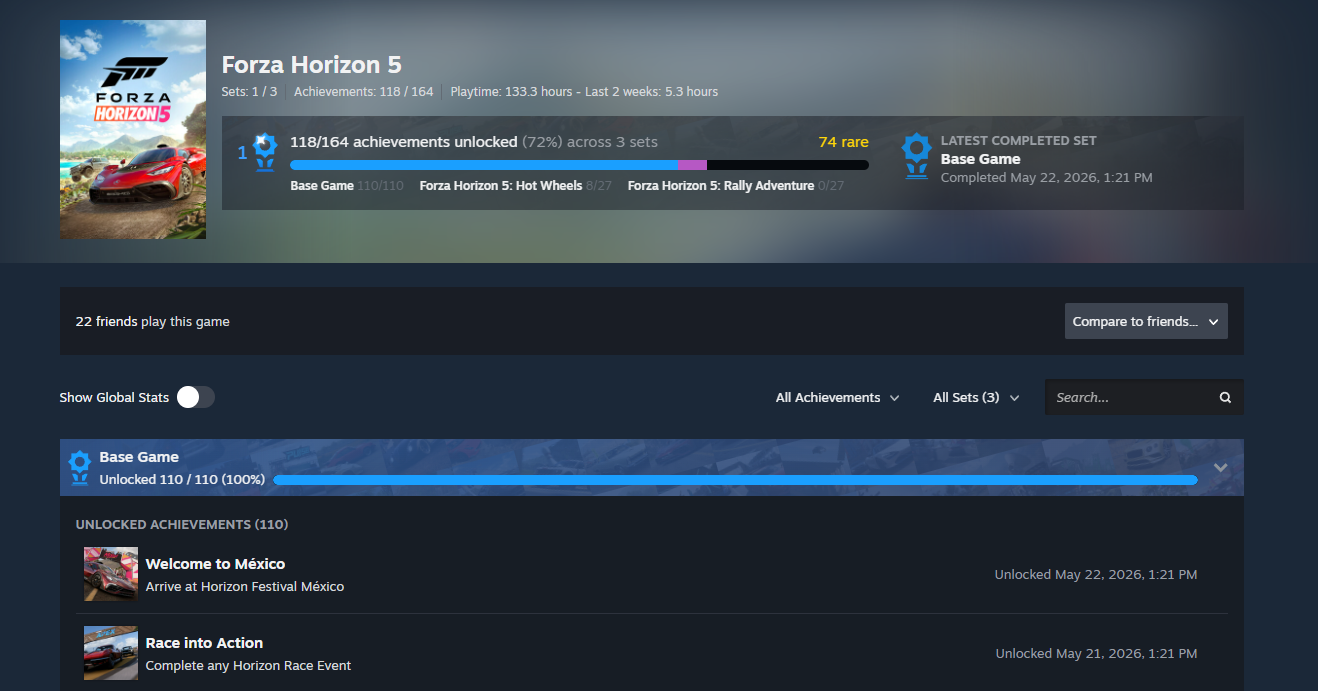
Steam Achievement Sets
A new way to organize, track, and complete a game’s achievements. .
The prompt to opt-in to providing anonymized framerate data is now also shown in the Steam desktop client.
Multiple general stability improvements and fixes for rare crashes affecting small numbers of users.
Fixed some cases the Steam Service Error dialog was showing incorrectly if you quit/restarted Steam quickly.
Fixed multiple edge cases that could cause memory leaks in game streaming and controller code.
Fixed an error displaying dates for users in British Columbia.
Fixed a case where Steam Cloud Sync would incorrectly show a conflict in some games, e.g. Monster Hunter World.
Fixed the Uninstall Failure dialog not showing.
Fixed a case where a firmware update would still show up as available for a few seconds after it was applied.
Fixed an issue where the friends list could get stuck when failing to login at launch and required toggling offline to load the friends list.
Fixed “friend joins a game” notifications being dropped when several friends start games within 10 seconds.
Fixed a bug that would cause “When a friend comes online” and “When a friend joins a game” notification sounds to not respect “Show Notification Toasts” and “Play a sound when a notification toast is displayed” settings.
Fixed Steam Frame native-only content showing as installable on Windows.
Fixed the layout of the volume slider in the voice chat context menu.
Fixed various cases where the steam windows could briefly flash black.
Library
-
Improved offline support for the activity feed and fixed cases where it could previously skip loading some events.
Store
-
Updated algorithm for search suggestions and text searches.
Big Picture Mode
-
Game invites from friends now have a dedicated widget in the chat window above the text entry, instead of having to navigate to the exact message in the chat history window. Individual invites from friends in a group also show in the group chat window instead of having to navigate to the individual friend’s 1-1 chat tab to accept.
-
Updated the styling of the chat tab to better convey focus states.
-
Improved the group chat layout and fixed areas where gamepad navigation could get stuck.
-
Friend chat message notifications will now be rolled up rather than sending one 2 second notification per message.
-
Plumbed the per-friend voice chat levels to the friend context menu in BPM.
-
Improved Quick Access Menu responsiveness.
-
Added Timezone selection entries for locations with changes to daylight savings time, e.g. British Columbia, Alberta, Manitoba.
-
Background art will appear on the home screen when High Contrast is enabled.
-
Fixed a bug that caused per-friend notification settings to be ignored.
Remote Play
-
Added a “Display Style” setting to allow stretching and zooming when the stream is a different aspect ratio than the client display.
-
Big revamp of HDR support:
-
Added an advanced client setting for HDR, with options for Automatic (enabled when HDR content is enabled), On (always on, allowing increased brightness for SDR content), and Off.
-
Added a brightness slider to the streaming overlay.
-
In addition to supporting HDR in games and on Windows desktop, HDR capture is now supported when using pipewire on desktop Linux and streaming from macOS.
-
HDR is enabled again on Steam Deck OLED.
-
HDR is enabled on Android phones running Android 15 and newer, when using the beta Steam Link app (https://play.google.com/apps/testing/com.valvesoftware.steamlink)
-
-
Start streaming faster when connecting to a local computer.
-
Fixed the “…” button on the Steam Controller not being passed through to the remote side.
Steam Input
-
Added support for GameInput v4.
-
Fixed NCAA Football 27 not getting the game configuration applied at game startup.
-
Fixed “Joystick Power Curve” setting in “Gyro to Joystick Camera” and “Gyro to Joystick Deflection” modes. This setting was not being applied. If you have changed this setting in the past, you may notice a change in the response – reset this setting if necessary, before tuning further.
-
Fixed a bug where the “listen for binding” mode could bind multiple things on Dpad input.
Linux
-
The Steam client is now a 64bit application.
-
The Steam client now runs inside a Steam Runtime container.
-
This will help the Steam client provide a more consistent experience across multiple distributions. This is the same technology used by Steam games.
-
-
Re-styled the Steam updater UI.
-
Fixed a case where Steam updater UI would fail to show for some users.
-
Fixed a crash when resuming from suspend.
-
Fixed a crash when creating a lobby in games that use the ISteamNetworking interface, e.g. Sons of the Forest.
Steam Controller Firmware
-
Fixed an issue where shutting down a controller while docked to the puck could cause it to turn back on.
-
Reduced thumbstick touch sensitivity to reduce likelihood of early detection of touch.